Migrating to React Web:
A Brutal Survival Guide
We arrogantly assumed porting Wordgenie to the browser would be a weekend job. Then we remembered the brutal reality of local state management.
"The gap between a mobile app and a web app isn't just about screen size. It's about data. On mobile, you own the hard drive. On the web, you're just renting a volatile sandbox."
React Native and React Web are supposed to be identical paradigms. They share the same component logic, right? That's the lie we told ourselves when we initiated the port for Wordgenie 6.0. The reality was violently messier. We had an application built aggressively around an "offline-first" architecture leveraging raw SQLite, and suddenly we had to trick Chrome into running it.
We vehemently refused to rewrite the backend codebase from scratch. Economically, it was suicide. We had to engineer a bridge to preserve our existing logic—the spaced repetition algorithms, the monetization gates—while cleanly ripping out and replacing the storage engine underneath it. Here's exactly how we survived the migration without completely destroying the product.
1. The Catalyst: The Chromebook Problem
Wordgenie started as a mobile app. It was great. But then we started getting emails from teachers, and those emails all said the same thing:
"My students have school-issued Chromebooks. They can't install apps."
"I tried to AirPlay the quiz to the whiteboard, but the school wifi blocked it."
We couldn't "feature update" our way out of hardware restrictions. We had to be on the web. The problem? Our app was a "Heavy Client." It didn't just fetch data; it crunched it locally using raw SQL queries. Browsers generally hate that.
2. Faking SQLite in the Browser
The heart of our app is the Spaced Repetition System (SRS). It runs SQL queries to figure out which cards you need to study. On mobile, we use `react-native-nitro-sqlite`. It's fast and direct.
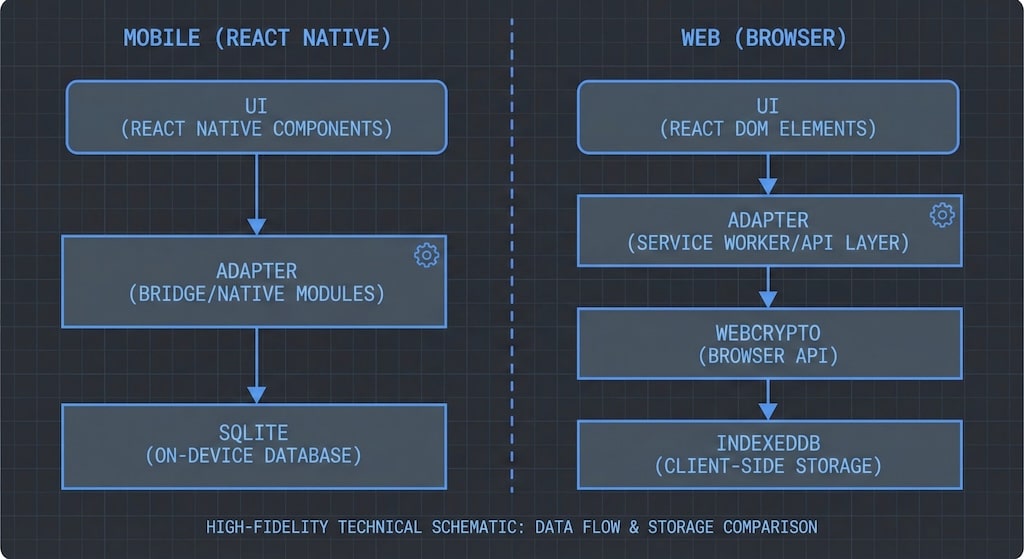
On the web, you have IndexedDB. It is... not SQL. We looked at WASM-based SQLite ports, but the load times were too heavy for a quick vocabulary quiz. So, we cheated. We built a Service Adapter.
Figure 1: The "Don't Look Under the Hood" Architecture
The UI just asks for data. It doesn't care if it comes from SQL or a JSON blob in IndexedDB.
Basically, we kept `DataService.js` almost identical. On mobile, it talks to SQL. On the web, `WebDataService.js` pretends to be SQL but actually talks to IndexedDB. We also had to use the Web Crypto API to encrypt the data, because unlike a phone's file system, IndexedDB is pretty easy for a curious user to inspect and edit if they want to hack their high score.
3. The Monetization Scare
This was the part that made us sweat. We use a "Glimpse" model—you get 3 free decks, then you pay.
- Deck Creation: Limit 3.
- Reading Passages: Limit 3.
If we messed up the migration, we'd either lock out paying users or give everything away for free. Both are bad. Because we used the adapter pattern above, we didn't have to touch the `FeatureGate.js` logic. It still asks "How many decks?" and the Data Service handles the counting. We literally copy-pasted the business logic file. It worked on the first try. (I was as surprised as anyone).
4. Skia vs. Canvas (The Visual Stuff)
We use `react-native-skia` to generate those "Share your Score" images. Skia doesn't run natively in the DOM without heavy dependencies. We decided to rewrite this part manually.
If it's complex (gradients, blending) -> Rewrite in HTML5 Canvas API.
If it's simple -> Just use html2canvas and hope for the best.
It wasn't a perfect 1:1 translation—web fonts render slightly differently than mobile fonts—but for a viral share image, it was close enough.
5. The "Don't Get Clever" Prompt
We used AI to help with the grunt work of syntax conversion. But LLMs have a bad habit: they try to "fix" your code. They see a `switch` statement and try to turn it into an object map. They see a legacy flag and try to delete it.
We had to stop that. We ended up using a prompt that was basically yelling at the AI to stop being smart and just be a translator.
Your job is TRANSLATION, not optimization. Do not "improve" the code.
1. Styling
- **Source:** `style={tw'p-4'}`
- **Target:** `className="p-4 bg-background"`
- Do not try to get creative with colors. Stick to the system.
2. Logic (DO NOT TOUCH)
- If the code looks ugly, KEEP IT UGLY.
- Preserve all `useEffect` dependencies, even if they look redundant.
- Keep the `MENU_OPTIONS` array exactly as is.
3. Platform Swaps
- `ActivityIndicator` -> `<Loader2 />`
- `@env` -> `import.meta.env`
6. Keeping the Codebase Sane
To make it easier for the team to jump between the Mobile repo and the Web repo, we forced the directory structures to match. If `DailyCalendar.jsx` is in `src/components/` on mobile, it lives there on the web, too.
Conclusion
Migrating from Native to Web wasn't about finding the perfect architecture; it was about translation. By drawing a hard line around our Data Layer and being strict with our AI prompts, we got Wordgenie running in the browser without rewriting the business logic that took us two years to build. It's not the cleanest code in the world, but it works, and the teachers are happy. That's good enough for us.